Homework, accounted for
Tonight's homework, done and proven.
DueTonight sorts your Google Classroom work by what's due, builds a realistic plan for tonight, and shows parents real proof — not just a checkbox.
Tonight's Hit List
Tell it your budget — 60 minutes — and it picks the work that actually fits tonight. Overdue and due-tomorrow first.
Proof of work
Snap your finished page. It's checked against the assignment — mismatches get flagged for parent review instead of quietly counting.
Parent portal
A separate parent account with its own PIN sees remaining, overdue, and a daily digest. A student login can't open it.
AI study co-pilot
Answers with real quotes from the exact slide or page your teacher posted — plus practice problems, quizzes, and flashcards.
Socratic tutor & spaced review
Coaches with questions instead of handing over answers. Concepts your student struggles with are saved privately and re-quizzed until mastered.
Week-ahead planner
Seven days of due work with suggested study minutes per day — families plan the week, not just tonight.
Weekly family recap
A Sunday email sums up completions, on-time rate, streaks, and points. Parents set frequency and quiet hours — or turn it off.
Points & streaks
Verified work earns points, finishing early earns more, and leftover study time banks as bonus minutes for the weekend.
Grade tracker
Grades from Google Classroom or entered by hand, trended over time — so families see progress, not just completion.
See it in action
Two views, one honest picture.
Students get a plan for tonight; parents get the truth about how it went — from separate accounts.
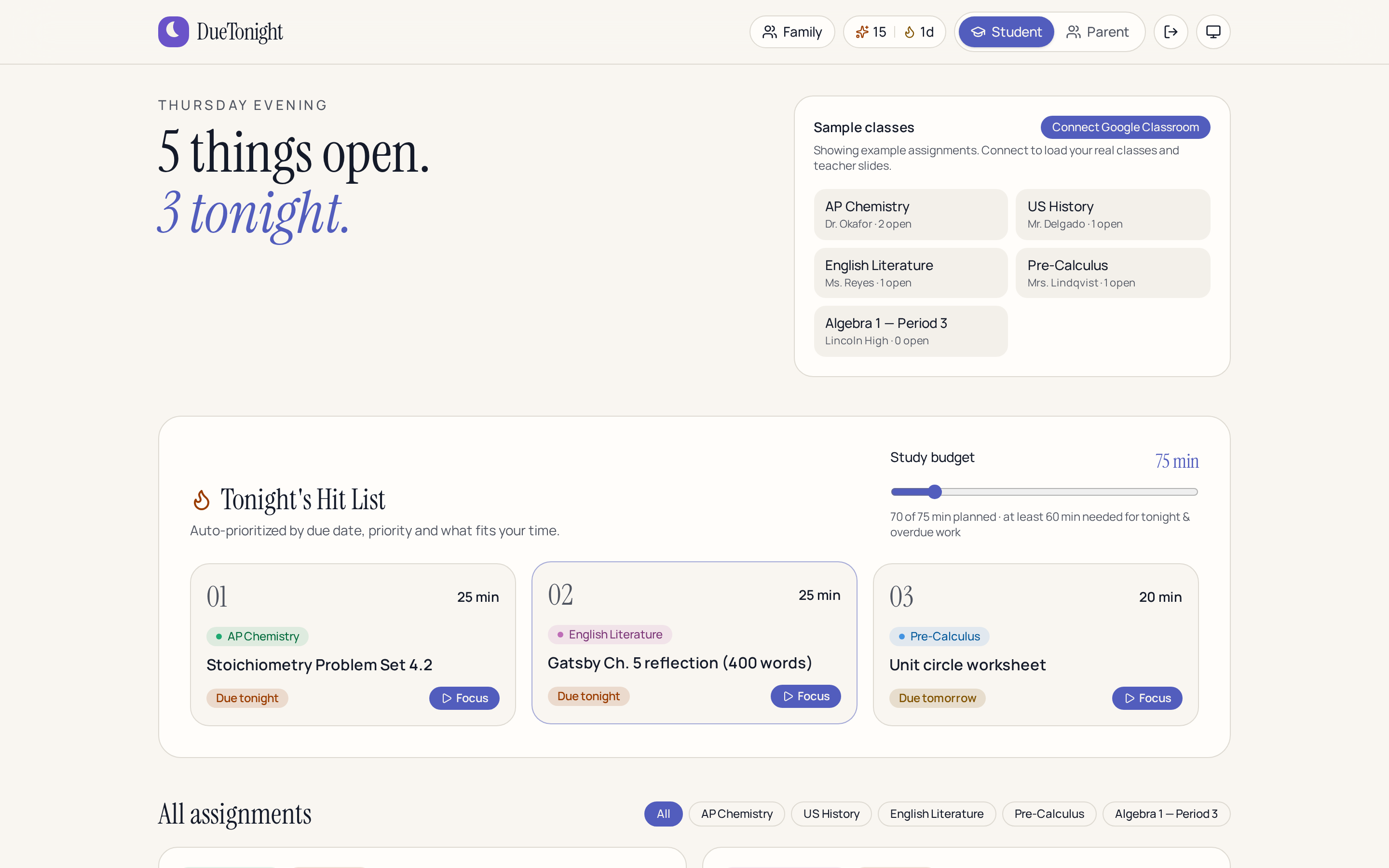
Student view
Tonight, planned for you
The Hit List auto-prioritizes by due date and fits the work into a study budget that never drops below what's actually urgent.
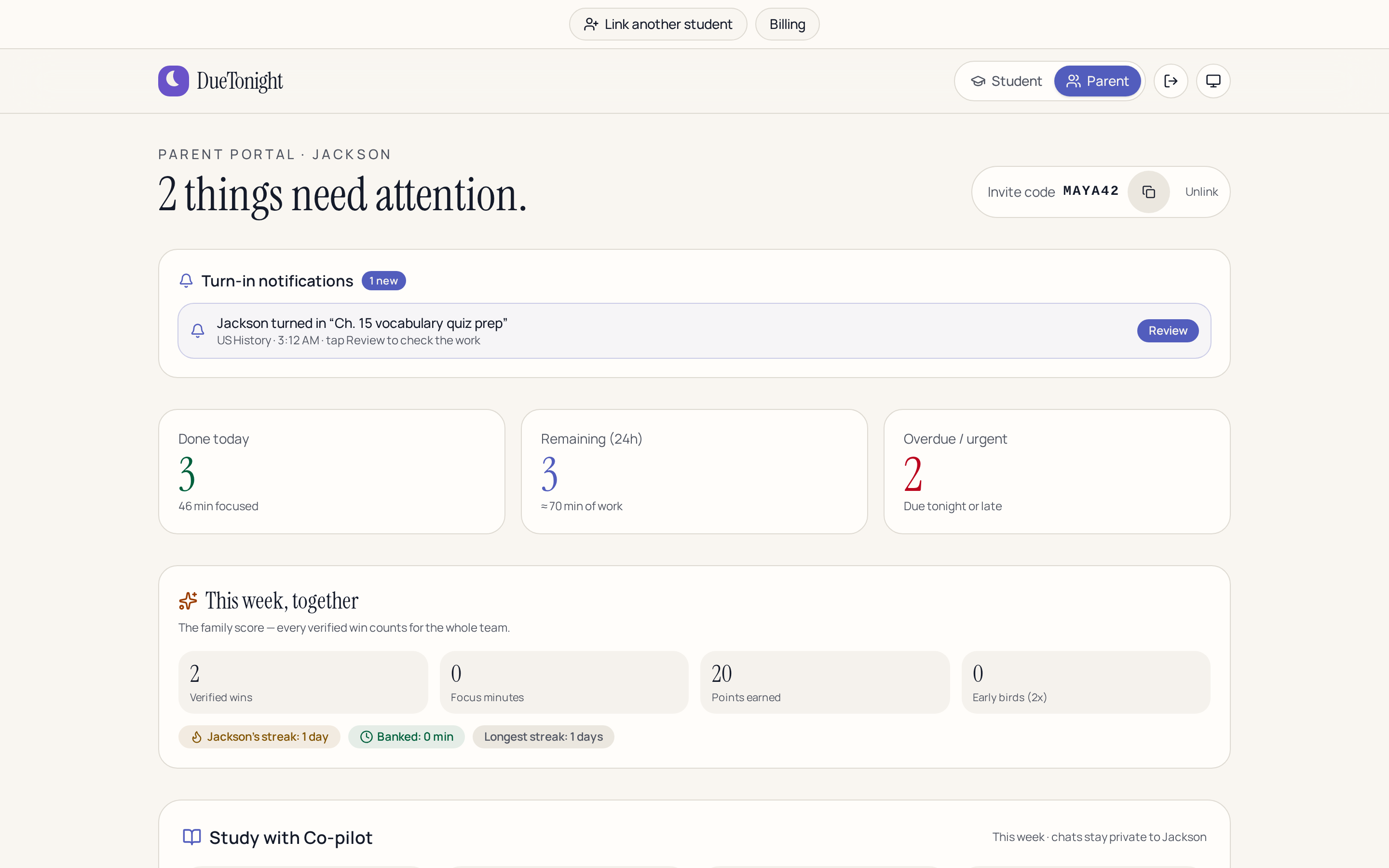
Parent view
Proof, not promises
Turn-in notifications, overdue alerts, and verified wins — behind a parent-only PIN, with student chats kept private.
Try it now — no account needed
Plan a sample study night.
This is the real planner with sample assignments. Drag the budget, check things off, and watch the Hit List re-plan itself.
The floor rises on its own — it never drops below what tonight's and overdue work actually need (right now: 75 min).
65 of 90 min planned
3 on the Hit List · 3 waiting for another night
In the real app this list comes straight from Google Classroom — and parents see the results.
Plan my real tonight- Due tonightHit List
Stoichiometry Problem Set 4.2
AP Chemistry·35 min
- Due tonightHit List
Gatsby Ch. 5 reflection (400 words)
English Literature·25 min
- Due tomorrow
Unit circle worksheet
Pre-Calculus·20 min
- Due in 2 days
Reconstruction DBQ outline
US History·45 min
- 14h overdueHit List
Ch. 15 vocabulary quiz prep
US History·15 min
- Due in 3 days
Lab report: Titration curves
AP Chemistry·60 min
How it works
One honest loop, every night.
Plan tonight
Set how much time you actually have. The Hit List fits the most urgent work into that budget — and never hides an overdue assignment to make the plan look prettier.
Do the work
Work the checklist. Stuck on the material? Ask the co-pilot about the slides your teacher posted and get answers you can trace back to the source.
Prove it
Snap a photo of the finished page. If it matches the assignment, it counts and your parent gets notified. If it doesn't, it goes to review — no shortcuts.
Deep dive
An AI co-pilot that shows its sources.
- Built from the real assignment. It reads the slides, docs, and materials your teacher actually posted in Google Classroom — not a generic textbook answer.
- Every claim has a citation. Answers quote the exact text and point to the slide or page it came from, so students learn to check sources instead of trusting a chatbot.
- Practice, not just answers. Sample problems, auto-graded quizzes, and flashcards made from your own class materials. Chats stay private — parents get a study summary, never your conversation.
Co-pilot answer (example)
Chloroplasts absorb light mostly with chlorophyll, which sits inside the thylakoid membranes.
Cited from: Photosynthesis notes — Slide 12
“Chlorophyll in the thylakoid membranes captures light energy…”
Illustrative example — in the app, citations point to the student's own posted materials.
Two sides, one loop
Built differently for students and parents.
For students
- A realistic plan for tonight that respects your time
- Homework help with citations — not answers to copy
- Points, streaks, and banked time that reward starting early
- Your own Google Classroom syncs itself — connect once
- Your chats and study material stay yours
For parents
- Join with your student's invite code — link or QR code
- Real proof of work to review, not just a green checkmark
- A notification when your student turns work in
- A daily digest of remaining and overdue work
- Multiple students, one parent account — switch anytime
Curious what's coming next? See the public roadmap.
Pricing
Start free. Grow when it works.
Family
$9.99 / month
14-day free trial · or $99.90/year (2 months free)
- Student dashboard + Hit List
- Parent portal for one family
- AI study co-pilot with citations
- Points, rewards & streaks
- Grade tracker
Classroom pilot
Per class
$249 / class / year
- Full Family plan for every student's family — families pay nothing
- Teacher pilot dashboard
- Class roster & join codes
- Completion & engagement analytics
- Early-warning flags for advisors
School & district
Custom
- Everything in Pilot
- Bulk provisioning & admin console
- School-wide outcomes reporting
- SSO / roster integration options
- White-labeling for districts
Teachers never see student chats or uploaded files — only completion and engagement. Per-class pilot pricing is indicative and confirmed with your school before any agreement.